All posts by Ichiramen
Plot vector field using Matplotlib
Below is a sample script to plot vector field using the package matplotlib in Python
import numpy as np
import matplotlib.pyplot as plt
x,y = np.meshgrid(np.linspace(-5,5,10),np.linspace(-5,5,10))
u = 1
v = 0
# (u,v) = (1,0) : left to right
# (u,v) = (0,1) : up
plt.quiver(x,y,u,v,color='blue')
plt.show()
Shortcut to open file location in SublimeText 3 on Windows 10
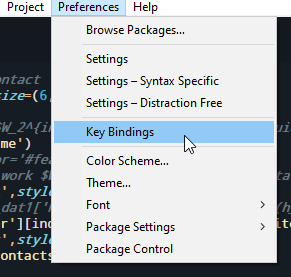
By adding the following code to Preferences -> Keybindings, now you can quickly open the Folder containing the script you are working on. Very convenient for collecting result, investigate script and so on.
{ "keys": ["ctrl+alt+e"], "command": "open_dir",
"args": {"dir": "$file_path", "file": "$file_name"} }

Put plots by Matplotlib to your standard
This post provide the modification for python script for plotting using matplotlib.
plt.rcParams['font.family'] = 'Myriad Pro'
plt.rcParams['font.serif'] = 'Myriad Pro'
plt.rcParams['font.monospace'] = 'PragmataPro Mono Liga'
plt.rcParams['font.size'] = 12
plt.rcParams['axes.labelsize'] = 12
plt.rcParams['axes.labelweight'] = 'bold'
plt.rcParams['axes.titlesize'] = 10
plt.rcParams['xtick.labelsize'] = 10
plt.rcParams['ytick.labelsize'] = 10
plt.rcParams['legend.fontsize'] = 10
plt.rcParams['figure.titlesize'] = 12
Lost Desktop icons after uninstalling Komorebi on Linux Mint
Komorebi is an application that enables animations for desktop wallpapers. When uninstall Komorebi, there is a possibility that desktop will become unresponsive: desklets are still displaying but no icons, right click doesn’t show anything. To fix it, run this code in Terminal:
gsettings set org.nemo.desktop show-desktop-icons true
Thing should be fine after this.
Matlab 2020a on Ubuntu 18.04: Fix blank page when using Doc
I’ve just installed Matlab 2020a on Linux Mint 19 and I had an issue that the Doc doesn’t show anything but blank page. To fix it, installing Chromium Web Browser and disable Windows Effect in System Setting.
For coding font: Fira Code (free on Google Font) is a very good choice. Don’t forget to turn on anti-alias, it might improve your experience.
Best way to install Node.js and NPM
I’m writing this post as I need to install node.js and npm to install packages for reveal.js, I’m on Ubuntu 18.04 Bionic.
Normally we can install node.js via terminal by
sudo apt install nodejs
But this is not the best way since the version is outdated and some dependencies won’t meet. The best way to install the latest node.js and npm is via nvm.
curl -o- https://raw.githubusercontent.com/creationix/nvm/v0.33.8/install.sh | bash
Note that the version number can be checked by going directly to the website and see. The above script will download all the package and put nvm into the Linux alias (so we can use the nvm command globally). After this, log out and log in to activate the alias.
Once you log in, run below script
nvm install node
To update:
nvm install node
nvm alias default nodenvm install node
nvm alias default node
From this answer: https://askubuntu.com/a/1009527
Math Tools
“Mathematicians do not recognize their discipline in such descriptions. We see arithmetic and algebra as tools used in doing mathematics, just as hammers and handsaws are tools used in carpentry. For professionals, mathematics is about curiosity, imagination, and solving problems. There are questions that are instinctive and natural for mathematicians that rarely occur to those looking in from the outside. There is such a thing as a mathematical view of the world. Sadly, it is a view that is too often hidden from those struggling to learn the subject.”
From the book Taking Sudoku seriously
Import mô hình 3D từ Blender vào YADE
Blender là phần mềm thiết kế 3D nguồn mở.
YADE là phần mềm mô hình phần tử rời rạc, cũng nguồn mở.
YADE có thể tạo một khối hình học 3D và hỗ trợ tương đối khiêm tốn: hình hộp, hình cầu, xi-lanh….
Tuy nhiên, những hỗ trợ căn bản của YADE nhiều lúc không phục vụ được nhu cầu thực tế của xây dựng dân dụng. Đặc biệt khi người dùng cần fill particles vào trong một khối có hình dạng ngẫu nhiên. Rất may là YADE có hỗ trợ định dạng GTS và có một công cụ giúp chuyển đổi file từ STL (một dạng file 3D thông dụng từ blender) sang GTS, đó là stl2gts. Câu lệnh để dùng rất đơn giản: ví dụ có một file cube.stl và bạn muốn đổi nó thành cube.gts, cú pháp cần gõ trong terminal như sau:
”’ stl2gts < cube.slt > cube.gts ”’
Thường thì quá trình convert diễn ra khá nhanh. Ngay khi có file gts bạn có thể import vào trong YADE bình thường vì YADE có hỗ trợ python-gts.
Some FEM-DEM coupling attempts
FEM and DEM are well-known for studying structural analysis and behavior of granular materials, respectively. There are some special cases that we wish to combine the two methods to profit all the strong points from both methods. Here are a list of what I’ve found till the writing time of this blog post.
1. YADE – OOFEM
YADE is pretty well-known in Europe as an open-source DEM tool, written in C++ and PYTHON, and OOFEM is a FEM tool (latest version is 2017).
2. YADE – ESYS
Also from YADE document page, the link between FEM-DEM has been made using these two tools.
Very basic at the moment, lacks some serious development.
3. EDEM – ABAQUS
From version 2018, EDEM shows some supports for porting to ABAQUS. To some academic members, ABAQUS is their favorite numerical tool to do structural analysis.
4. YADE – COMSOL
There is a module developed by University of Ottawa, Canada to couple FEM-DEM using YADE and COMSOL based on JAVA linking.